The Importance of Proactive IT Support in 2026
Table of Contents
Proactive IT support is about preventing problems before they happen. It keeps your systems secure, fast and reliable so your team can work without disruption. In 2026, with rising cyber threats and increasing reliance on cloud tools, proactive IT support is essential for any business that wants to protect data, reduce downtime and control costs. This matters even more for growing companies that need dependable systems to serve customers, hit targets and scale with confidence.
In this guide, you will learn what proactive IT support is, why it matters now, the most common risks businesses face, how to fix them, and how Omnia Systems can help. You will also find practical steps you can take today to strengthen your IT setup. If you want clear, simple advice you can put into action, this article is for you.
What is proactive IT support?
Proactive IT support focuses on preventing issues rather than reacting to them after they disrupt your business. It includes continuous monitoring, regular updates, patching, preventive maintenance, user training and planning for future needs. Instead of waiting for systems to fail, proactive support finds early warning signs and addresses them before they cause downtime or data loss.
How proactive support differs from reactive support
Reactive support: You call for help when something breaks. Your team waits while systems are fixed. This causes stress and lost productivity.
Proactive support: Problems are identified early and fixed during planned windows. Your team keeps working with fewer interruptions.
Why this matters in 2026
- Cyber attacks are more frequent and more advanced.
- Businesses depend on cloud apps, remote access and mobile devices every day.
- Customers expect quick responses and uninterrupted service.
- Regulations and contracts often require strong security and reliable systems.
For organisations, proactive IT is now a competitive advantage. It improves uptime, protects your brand and keeps teams productive.
The core benefits of proactive IT support
Less downtime and higher productivity
When systems are monitored and maintained, you avoid unexpected outages. Patches and updates are applied after testing. Capacity is planned before it runs low. Your team spends less time waiting and more time serving customers.
Stronger security
By patching vulnerabilities, enforcing multi factor authentication, setting secure policies and monitoring for threats, proactive support reduces the chance of breaches and fraud. If an incident occurs, alerts trigger fast action to limit damage.
Predictable costs
Preventive maintenance reduces emergency call outs and expensive break-fix bills. With a managed service plan, you can budget monthly for support, security and improvements.
Better performance
Regular health checks, updates and optimisation keep systems fast and stable. Old or failing equipment is replaced before it causes problems. Your cloud setup is tuned for the way your team works.
Compliance and peace of mind
Proactive support helps you meet standards and customer expectations. Documentation, policies and backups are maintained. You know where your data is, who can access it and how to recover it.
Common IT problems businesses face and how to solve them
This section lists the issues we see most often in organisations, along with practical fixes you can apply.
Problem 1: Frequent email phishing attempts
Symptoms
Staff report suspicious emails. Some emails slip past spam filters. You worry about fake invoices or credential theft.
Why it happens
Attackers target busy teams. Filters are not tuned. MFA is not enforced. Staff are unsure what to report.
How to fix it
- Turn on multi factor authentication for all email accounts.
- Use advanced threat protection and safe links features where available.
- Run phishing awareness training every quarter.
- Create a simple reporting process for suspicious emails.
- Review mail flow rules and block known bad senders and domains.
Problem 2: Slow systems and frequent crashes
Symptoms
Logins take too long. Apps freeze. File access is slow. Complaints increase.
Why it happens
Devices are old. Storage is full. Updates are overdue. There is no capacity planning.
How to fix it
- Audit device age and performance. Replace hardware beyond recommended lifespan.
- Apply updates and remove unused software.
- Check network bandwidth and upgrade where needed.
- Move heavy workloads to the cloud with the right sizing.
- Schedule maintenance windows and communicate them to staff.
Problem 3: Weak backups or untested recovery
Symptoms
Backups are running but never tested. People assume data is safe but no one has restored a file recently.
Why it happens
Backups were set up once and forgotten. No documentation. No targets for recovery time.
How to fix it
- Confirm backups cover servers, endpoints and cloud data like Microsoft 365.
- Test restores every month for random files and at least twice a year for full systems.
- Set recovery time and recovery point targets and align them to the business.
- Keep backups separate from production and protect them with MFA.
Problem 4: Shadow IT and risky apps
Symptoms
Teams sign up to free tools without approval. Data is spread across many platforms. Security settings vary.
Why it happens
People need quick solutions. Official tools are hard to use. There is no clear guidance.
How to fix it
- Provide approved tools that meet needs and are simple to use.
- Publish a list of allowed apps and a simple request process for new ones.
- Monitor cloud usage and block known risky services.
- Educate staff on data handling and supplier risk.
Why proactive IT support is essential for Midlands and Manchester businesses
Local businesses face unique pressures. The UK has strong manufacturing, logistics, professional services, hospitality and tech sectors. Many firms work with national supply chains and serve customers who expect fast, reliable service. Any downtime hits output, deliveries and client confidence.
Specific local factors to consider
Multi-site operations: Many companies have warehouses, depots or satellite offices. This needs secure remote access, stable networks and consistent device standards.
Mixed device fleets: Teams often use a blend of desktops, laptops, tablets and mobiles. This needs clear policies and mobile device management.
Growth and scaling: Mergers, new sites and new service lines need planned infrastructure and licence management.
Recruitment and onboarding: Fast onboarding improves productivity. Standard builds and automated account creation save time and reduce risk.
Customer and supplier audits: Expect more security due diligence in 2026. Proactive IT gives you the evidence you need.
Proactive IT support gives organisations an edge by keeping operations smooth, data secure and teams supported.
How a managed service provider (MSP) can help
A managed service provider delivers proactive IT support on a monthly plan. They supply the tools, skills and processes to run your IT with consistent quality and predictable costs.
- 24×7 monitoring and alerting
- Patch and update management
- Security services such as MFA, endpoint protection and email security
- Backup, disaster recovery planning and regular test restores
- Helpdesk with clear response and resolution times
- Breadth of expertise: Access to specialists in security, cloud, networking and compliance.
- Proactive processes: Mature tools and tested playbooks to catch issues early.
- Predictable budgeting: Fixed monthly fee aligned to your needs.
How Omnia Systems supports you
Omnia Systems provides proactive IT support for businesses across the UK. We align technology with your goals, reduce risk and help your team work with confidence. Our services include monitoring, patching, security, backups, cloud management and user support, all delivered with clear communication.
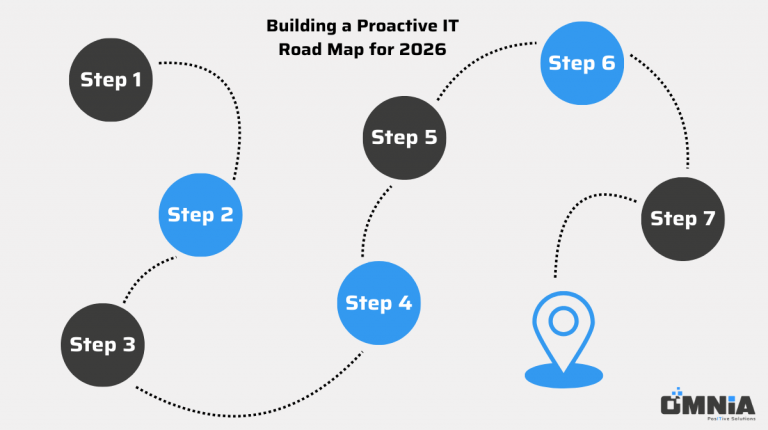
Building a proactive IT roadmap for 2026
A roadmap turns good intentions into a clear plan. Here is a simple structure you can adapt.
Step 1: Assess your current state
- Inventory devices, servers, apps and cloud services
- Review licences, security controls and backup coverage
- Identify single points of failure and known issues
- Gather feedback from users on pain points
Step 2: Define goals and priorities
- Agree the most important outcomes such as reducing downtime or improving security
- Set measurable targets for response times, patching and recovery
- Agree a realistic budget with room for gains over time
Step 3: Tackle quick wins
- Enforce MFA and review email security rules
- Fix urgent patching gaps and update old devices
- Test a restore from backup and confirm access
- Publish simple user guides for key tasks
Step 4: Improve foundations
- Standardise device builds and policies
- Implement centralised monitoring and alerting
- Set up automated patch management
- Segment networks and secure Wi-Fi properly
Step 5: Plan for resilience
- Define recovery time and point objectives
- Add backup internet and power protection where needed
- Test incident response and business continuity
Step 6: Train and support your team
- Run regular cyber awareness sessions
- Provide short, clear instructions for common tasks
- Encourage reporting of suspicious activity
Step 7: Review and iterate quarterly
- Check progress against targets
- Adjust plans based on changes in the business
- Capture lessons learned from incidents and tests
Security in simple terms: the essentials every business should have
The following measures are the baseline for 2026. They are effective, affordable and practical.
- Use multi factor authentication everywhere
- Use strong passwords with a password manager
- Control who can access what
- Protect every device
- Encrypt laptops and mobiles
- Keep everything update
- Manage devices from one place
- Strengthen email security
- Back up your data every day
- Secure your internet and Wi-Fi
Cost control without cutting corners
Good IT does not have to be expensive. The key is to invest in the right places.
Practical ways to save
- Replace ageing devices in planned cycles to avoid emergency costs
- Use standard builds and automation to reduce setup time
- Right size cloud resources and licences based on real usage
- Use managed security tools bundled in your platform where they meet your needs
Where not to cut
- Backups and recovery
- Security basics like MFA and patching
- Monitoring and alerting
- User training
Cutting these areas increases risk and usually costs more later.
How to choose the right managed service provider
Use these criteria to compare partners.
- Clarity: Plain English communication and transparent pricing
- Coverage: Monitoring, security, backups and helpdesk as standard
- Evidence: Reports that show patching, backup success and response times
- Experience: Relevant case studies and references in your sector
- Fit: A support model that matches your hours, locations and tools
- Proactivity: Regular reviews and a roadmap for improvements
Ask how they would onboard your business, how they handle incidents and how often you will meet to review progress.
Onboarding with Omnia Systems: what to expect
We make the process simple and structured.
- Discovery
We learn how your business operates, what success looks like and where pain points are.
- Assessment
We review devices, apps, licences, security and backups.
- Stabilise
We fix urgent issues, enforce MFA, complete patching and test backups.
- Standardise
We set monitoring, policies and standard builds across sites.
- Optimise
We improve performance, reduce risk and simplify user experience.
- Review
We meet regularly to plan next steps and align IT with your goals.
You get clear documentation, a named account manager and friendly support.
Next steps
Ready to reduce risk, cut downtime and keep your team productive in 2026?
Contact Omnia Systems today to book a friendly chat and free initial assessment. We will review your current setup, identify quick wins and build a clear plan to keep your systems secure, fast and reliable across the UK.
Let us manage your IT so you can concentrate on what matters most: your business.
0161 850 7530 | enquiries@omnnia-systems.co.uk